Glow for Free
How movy fakes neon in a terminal with one persistent buffer.
Intro
Since 0.3.0, movy has a glow feature: anything drawn through Frame can bloom, and anything that moves leaves a neon trail. I expected that look to be the expensive part of the engine. It turned out to be the cheapest — no bloom pass, no trail system, no per-object bookkeeping. One extra buffer and three operations per frame. This post is about why that's enough.
First, the canvas. A terminal is a grid of text cells, not a framebuffer. Truecolor gives you 24 bits per cell, and with the ▀ half-block you get two independently colored pixels per cell. That's enough resolution to be interesting — but the neon look isn't about resolution. It's about what movy does between frames.
movy doesn't really draw glow. It draws light, and then it's bad at forgetting.
The Expensive Way
The obvious way to make something glow is to glow it: for every bright object, draw a few blurred copies behind it, fading outward, every frame. It works. It's also slow and fiddly — each glowing thing needs its own halo, and if you want trails (that lovely motion smear) you now have to remember where everything was N frames ago and redraw its ghosts.
That's a lot of bookkeeping for an effect that's supposed to feel effortless. So movy doesn't track objects at all. It tracks light.
One Buffer, Persistent
A movy Frame keeps two floating-point RGB layers:
solid: []V3   // opaque stuff — backgrounds, bodies, tiles. Rewritten every frame.
glow:  []V3   // additive light. You add into it — and it PERSISTS across frames.
You draw opaque pixels into solid (with px / rect), and you emit light into glow (with gpx / grect). The solid layer is normal: clear it, redraw it, done. The glow layer is the trick — nobody clears it. It carries over.
Decay, Blur, Add
Every frame starts with one call, beginFrame(), which does exactly two things to that persistent glow buffer:
- Decays it — multiply every pixel by
glow_decay(0.72 by default). Last frame's light drops to about 72% of its brightness. - Blurs it — a cheap separable 1-2-1 blur, so light bleeds a little into its neighbors.
Then you add this frame's fresh emissions on top. At the end, composite() mixes it all down for the terminal:
// once per frame, before you draw anything:
frame.beginFrame();   // glow *= 0.72, then a 1-2-1 blur

// ... draw opaque pixels into `solid`, emit light into `glow` ...

frame.composite();    // clamp(solid + glow) -> vignette -> scanline
                      //   -> warmth -> flash -> tint -> surface
That's the entire engine of the look. Three operations — decay, blur, add — on one buffer. There is no glow "feature" anywhere in here. There's a buffer that fades and spreads, and then you keep pouring light into it.
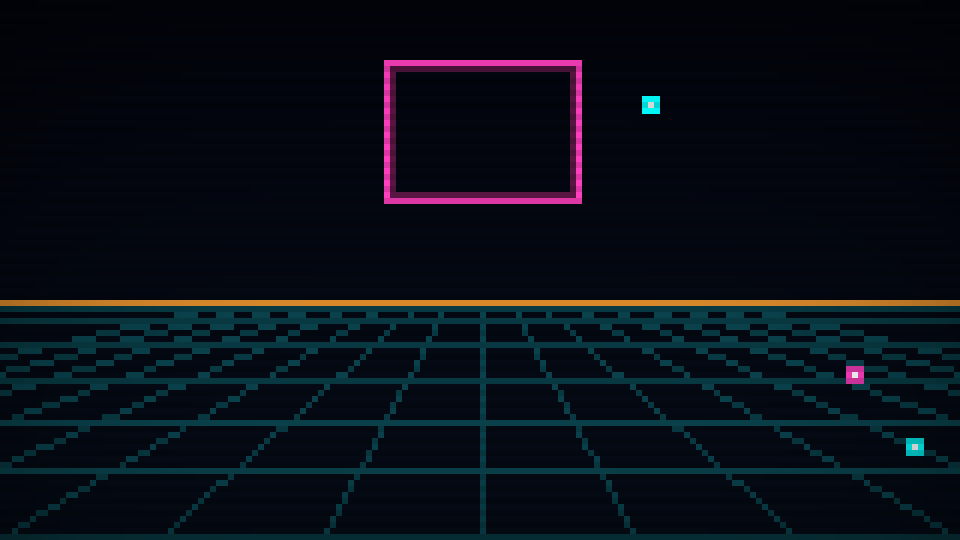 glow buffer off
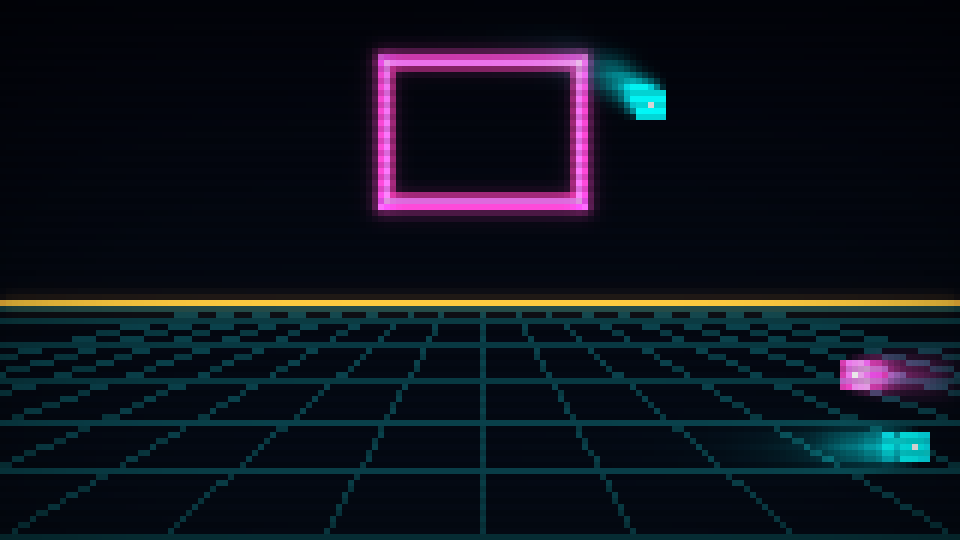 glow buffer on
Frame.savePng(), 160×90 px.)Why It Has to Be Float
Those layers are V3 — floating-point RGB — not u8. That's not premium pixels for the fun of it; it's load-bearing.
Light is additive: two beams that overlap are brighter than either one alone. If you store color in bytes and clamp at 255 the moment things get bright, every overlap flattens to white-ish mush and the bloom dies on contact. Keep it in float, let values run past 1.0 while they accumulate, and only clamp at the very end, inside composite(). That over-bright headroom — the range you're not allowed to display yet — is exactly where the glow lives.
Bloom and Trails Are the Same Thing
Here's the part I still find a little too satisfying. I never wrote a "bloom effect." I never wrote a "trail effect." Both just fall out of those same three operations, and which one you get depends on a single thing: whether the light moved.
- A bright pixel that stays put: each frame it's decayed and blurred, then re-lit at the same spot. It settles into a steady state — a soft, stable halo. That's bloom.
- A bright pixel that moves: each frame it lights a new spot while its old positions are still fading and spreading. The fading tail is a trail.
Same color at a still position each frame → stable bloom. If it moves → a trail.
One buffer, one decay constant, and the difference between two beloved effects is just motion. The glow isn't remembering objects — it's remembering light, and it does the remembering for you.
The Knobs
Because it's all just a buffer with a decay constant, art-directing the entire aesthetic comes down to a couple of public floats you can change any frame, no recompile:
glow_decay(0.72) — persistence. Lower is snappier and drier; higher gives longer, smearier trails. Push it toward 1.0 and the screen stops forgetting anything and the whole thing turns to soup. I know this because I tried it.glow_blur— the 1-2-1 blur, on or off. How far light bleeds.- and the CRT grade that runs after the mix:
scanline_mul(0.87, darken every other pixel row) andvignette_amt(0.22, darken the edges).
Honestly, half of what passes for "art direction" in movy is me dragging glow_decay up and down until a scene feels right.
Where It Ended Up
Because it costs nothing to switch on, it's switched on almost everywhere now. The two games I'm building on movy — GR1D, a Tron-style light-cycle game, and PHAZE, a run'n'gun — lean on it hard. Both are still under wraps; when they surface, every frame you'll see is this one buffer at work. And it has escaped the games: DUET, my tracker, pushes its music visualizers and the mixer's VU meters through the same Frame, so the mix glows too.
Underneath it's still what it was on day one: a buffer of light that decays and spreads a little every frame — more or less what the phosphor on an old CRT does. Glow isn't a feature you add. It's a feature you don't fully remove.