defMON wiki — features, interface overview, seqED key map
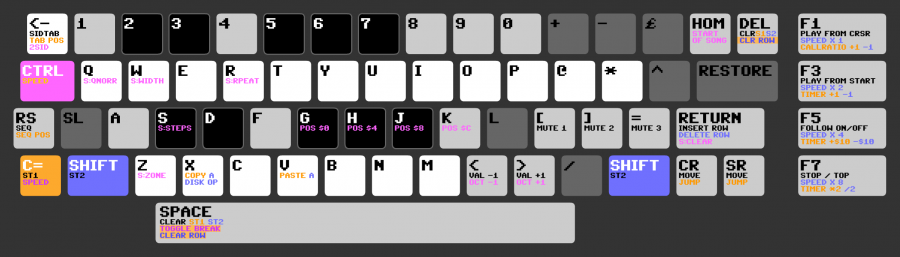
The unofficial documentation of defmon, frantic's C64 sid music editor, from the wiki mirror at defmon.vandervecken.com ("There is no official support for the program, but on this wiki you will find some bits and pieces of information"). Covers the design philosophy, the three screens, every sidTAB column, and the seqED keyboard — the latter only as an image (keys_seqed_v3.png), transcribed below, because "The old document that showed all keypresses seems to be gone from google drive somehow."
Key claims#
Design philosophy#
- "Power through simplicity and flexibility rather than a large number of 'special functions'": defMON "doesn't make a distinction between 'instruments' and 'effects'. Instead ALL control of sound is handled through the same sound editing table (the 'sidtab'), where you can make small snippets of sound settings ('sidtab chunks')."
- Each sequence step can execute two sidtab chunks at the same time; where both set the same parameter, the second overrides the first. Intended uses: vary a chunk without duplicating it, or use the second slot as an effect (slide, vibrato, …) — "You decide!"
- multispeed tunes: 1x, 2x, 4x and 8x. Stereo (2×) SID support. "Relatively low CPU usage… DefMON tunes can be, and have been, used in various demos and games."
- Stated limitations: little documentation (made for "in house" use); not self-instructing; things other editors automate need manual work here — hard-restart ("various tricks to avoid the ADSR bug in the SID") "is handled through sidtab chunks rather than through code, which means that you can do it the way you prefer yourself, although you have to do it manually"; same for vibrato: "you would create a vibrato the way you like it, rather than calling a pre-programmed vibrato."
The three screens#
- Main screen — Sequence Editor (seqED) showing note data for all three SID channels side by side (Voice 0/1/2), and the Sequence List (seqLIST) on the right, "a zoomed out view of the entire song" (the orderlist). RUN/STOP jumps between seqED and seqLIST.
- sidTAB — "where you make all the sounds and effects… The top part of the screen is actual table data that roughly corresponds to the registers of the SID chip. All instruments and effects are merely changes within these registers."
- Disk menu — load/save/pack.
Sequence anatomy (seqED)#
- Each line is a Step; all events in a step's columns execute simultaneously. All numbers in defMON are hexadecimal.
- Columns per voice: a read-only position column (highlights beats/divisions), two Sound Program columns (blue and green — pointers into the sidTAB, "the equivalent of instrument numbers or effect commands in other trackers"; hold C= to edit the first, SHIFT the second), the speed column (delay before the next step — bigger = slower; hold CTRL+C= to edit) and the note column (2-octave piano layout on the computer keyboard; a note shows as
C4, a sharp asC4#). - seqLIST rows hold one sequence number per voice;
FFin a voice column is a Jump command, with the number in the next voice's column as the target position (FF+00= loop to position 00 forever). - Info displays: an
Fnext to a voice header when that voice is filtered; top right shows filter band (L,B,Hfor low/band/high-pass) and the cutoff value ("200 Acids (official filter cutoff unit)" in the example); info bar bottom left (version number at startup), current octave bottom right.
sidTAB columns#
The row layout: step number, then JP DL WG WG AD SR TR AF PW PS RE FV CP and a four-digit cutoff (ACID).
- Step number — what you type in the seqED Sound Program columns. Highlighted rows (every 8th by default) mark chunks; insert/delete of table lines only affects the current chunk. Chunk size is shown bottom right and can be changed, or disabled by setting it to the whole table.
- JP (Step Jump) — jump to that line number; "allows you to create loops for vibratos and arpeggios."
- DL (Delay) — how long to wait before the next line (the wiki page words it "number of ticks (CPU cycles)"; per s-defmon-wiki-defmoning-102 the unit is actually player ticks, i.e. fraMES).
- WG (yellow, waveform) — SID waveform bits, use only the first digit (
1xtriangle,2xsaw,4xpulse,8xnoise). - WG (green, gate) — gate bit plus hardsync and ring modulation, use only the second digit.
- AD / SR — the adsr-envelope.
- TR (Transpose) —
$00–$7Fadd semitones to the sequence note (for arpeggios);$80–$FFset absolute pitches (see the table in s-defmon-wiki-defmoning-101). - AF (Finetune/Bend) —
$00–$7Ffinetune up with$19= one semitone;$80–$BFspeed of pitch bend up;$C0–$FFspeed of pitch bend down (detune, pitch-slide-and-portamento). - PW (Pulse Width) —
$08equals the 50% pulse. - PS (Pulse Sweep) —
$00–$7Fsweep left,$80–$FFsweep right (pulse-width-modulation). - RE — first digit filter resonance, second digit the voice bit mask; special defMON feature: mask value
8"activates the filter for the Voice the Sound Program is called from" (relative/current-channel filtering). - FV — filter type, first digit only.
- CP (Cutoff Offset) — relative value added/subtracted from the base cutoff, "similar to how TR column affects the pitch."
- CUTOFF (ACID) — four-digit cutoff; "defMON locks the minimum value at 200 Acids so you don't blow your speakers/eardrums" (filter-programming).
seqED key map (transcribed from keys_seqed_v3.png)#
The image is the only surviving key reference (the old spreadsheet of all keypresses is lost). Caption from the wiki: "Black and white keys are used for note input (protracker style). Dark grey keys are unused." Label colours on the image encode the modifier, matching the colour of the modifier key itself: black text = plain key, blue = with SHIFT, orange = with C=, magenta = with CTRL. ST1/ST2 = sidTAB call columns 1/2; S: prefixes are Super Command parameters (see s-defmon-wiki-supercommands).
| Key | Plain (black) | +SHIFT (blue) | +C= (orange) | +CTRL (magenta) |
|---|---|---|---|---|
← (back-arrow) | SIDTAB (toggle seqED/sidTAB) | — | TAB POS | 2SID (switch SID 1/2) |
| HOME | — | — | — | START OF SONG |
| DEL | CLR (with S1S2 in blue on the same line) | (see note 1) | CLR ROW | — |
| CTRL | (modifier key, magenta) | — | SPEED (= CTRL+C=: edit speed column) | — |
| Q | — | — | — | S:QNORR (note 2) |
| W | — | — | — | S:WIDTH |
| R | — | — | — | S:RPEAT |
RUN/STOP (RS) | SEQ (toggle seqED/seqLIST) | — | SEQ POS | — |
| S | — | — | — | S:STEPS |
| G / H / J / K | — | — | — | POS $0 / POS $4 / POS $8 / POS $C (cursor to that row) |
[ / ] / = | MUTE 1 / MUTE 2 / MUTE 3 | — | — | — |
| RETURN | INSERT ROW | DELETE ROW | — | S:CLEAR |
| C= | (modifier key, orange) ST1 | — | — | SPEED (edit speed column) |
| SHIFT | (modifier key, blue) ST2 | — | — | — |
| Z | — | — | — | S:ZONE |
| X | — | DISK OP (disk menu) | COPY A (A in blue) | — |
| V | — | — | PASTE A (A in blue) | — |
< | VAL −1 | — | — | OCT −1 |
> | VAL +1 | — | — | OCT +1 |
| SPACE | CLEAR (with ST1 in orange, ST2 in blue on the same line) | — | CLEAR ROW | TOGGLE BREAK |
CRSR keys (CR, SR) | MOVE | — | JUMP | — |
| F1 | PLAY FROM CRSR | SPEED X 1 | CALLRATIO +1 (−1 in blue, i.e. C=+SHIFT) | — |
| F3 | PLAY FROM START | SPEED X 2 | TIMER +1 (−1 in blue) | — |
| F5 | FOLLOW ON/OFF | SPEED X 4 | TIMER +$10 (−$10 in blue) | — |
| F7 | STOP / TOP | SPEED X 8 | TIMER *2 (/2 in blue) | — |
Note keys (white/black, protracker piano style): number row 2 3 5 6 7 are the black keys, Q W E R T Y U I O P @ * and Z X C V B N M the white keys, with S D G H J as the lower octave's sharps (G/H/J double as CTRL position jumps). Unused (dark grey) keys: 1 4 8 9 0 + − £ ^ / A F L SL RESTORE.
Transcription notes:
- DEL's first line reads
CLRin black followed byS1S2in blue; the split between the plain and SHIFT meaning is not explicit in the image. - The magenta label on Q reads
S:QNORRin the pixel font; the last letters are hard to make out and the meaning of this Super Command parameter is not documented anywhere in the surviving texts — transcribed as seen, not interpreted. - On the F-keys, the orange/blue pairs (
+1/−1etc.) follow the pattern C=+Fn / C=+SHIFT+Fn documented in s-defmon-wiki-defmoning-102; note that 102's own text maps the timer keys differently (±1 cycle on F1/F2, ±80 on F3/F4) — the v3 key map presumably reflects a later layout.
Practical takeaways#
- defMON is a "single-table" editor: learn the sidTAB column order and you know the whole sound engine, because it maps almost 1:1 onto SID registers (wavetable-programming and instrument-tables collapse into one structure here).
- The two-sound-programs-per-step system is defMON's replacement for effect commands: keep the instrument in the first slot and put reusable modifier chunks (slide, vibrato, filter change) in the second.
- The
8in the RE mask ("filter the calling voice") makes filter chunks reusable across voices — a feature other C64 editors lack. - Cutoff is entered in an absolute four-digit "Acids" unit with a floor of 200, plus a separate relative CP column — two cutoff controls, so a filter envelope can be offset without rewriting it.
Notable quotes#
- "Power through simplicity and flexibility rather than a large number of 'special functions'." (features page)
- "All instruments and effects are merely changes within these registers." (interface overview)
- "defMON locks the minimum value at 200 Acids so you don't blow your speakers/eardrums." (interface overview)
Relevance to the wiki#
The primary interface/sound-engine reference for defmon — the source for the tool entity's cheat sheet, and for defMON subsections on instrument-tables, filter-programming, pulse-width-modulation, chord-arpeggio, adsr-envelope and hard-restart. The key-map table above is the only surviving key reference for the program.
Pages touched#
defmon, frantic, sid, commodore-64, tracker, orderlist, instrument-tables, hard-restart, multispeed, vibrato, chord-arpeggio, filter-programming, pulse-width-modulation, adsr-envelope, ring-modulation-and-sync, detune, pitch-slide-and-portamento